Sunday, 5 July 2015

12c Database Datapump Enhancements

12c Database Datapump Enhancements


Below are some of enhancements for Datapump

 1)      In 12c You can use the DISABLE_ARCHIVE_LOGGING Parameter
               to specify that objects be loaded with nologging of redo.
            Example:

    Schema level

$ impdp scott/tiger directory=RM_dir dumpfile=scott01.dmp transform=disable_archive_logging:Y
Import: Release 12.1.0.1.0 - Production on Mon Jul 6 05:20:49 2015
Copyright (c) 1982, 2013, Oracle and/or its affiliates.  All rights reserved.
Connected to: Oracle Database 12c Enterprise Edition Release 12.1.0.1.0 - 64bit                                                                Production
With the Partitioning, OLAP, Advanced Analytics and Real Application Testing opt                                                               ions
Master table "SCOTT"."SYS_IMPORT_FULL_01" successfully loaded/unloaded
Starting "SCOTT"."SYS_IMPORT_FULL_01":  scott/******** directory=RM_dir dumpfile                                                               =scott01.dmp transform=disable_archive_logging:Y
Processing object type SCHEMA_EXPORT/PRE_SCHEMA/PROCACT_SCHEMA
Processing object type SCHEMA_EXPORT/TABLE/TABLE
Processing object type SCHEMA_EXPORT/TABLE/TABLE_DATA
. . imported "SCOTT"."DEPT"                              6.007 KB       4 rows
. . imported "SCOTT"."EMP"                               8.757 KB      14 rows
. . imported "SCOTT"."SALGRADE"                          5.937 KB       5 rows
. . imported "SCOTT"."BONUS"                                 0 KB       0 rows
Processing object type SCHEMA_EXPORT/TABLE/INDEX/INDEX
Processing object type SCHEMA_EXPORT/TABLE/CONSTRAINT/CONSTRAINT
Processing object type SCHEMA_EXPORT/TABLE/INDEX/STATISTICS/INDEX_STATISTICS
Processing object type SCHEMA_EXPORT/TABLE/CONSTRAINT/REF_CONSTRAINT
Processing object type SCHEMA_EXPORT/TABLE/STATISTICS/TABLE_STATISTICS
Processing object type SCHEMA_EXPORT/STATISTICS/MARKER
Job "SCOTT"."SYS_IMPORT_FULL_01" successfully completed at Mon Jul 6 05:21:00 20                                                               15 elapsed 0 00:00:10

 Nologging for Index

$impdp system/admin DIRECTORY=RM_dir DUMPFILE=scott02.dmp  schemas=scott TRANSFORM=DISABLE_ARCHIVE_LOGGING:Y:INDEX
Connected to: Oracle Database 12c Enterprise Edition Release 12.1.0.1.0 - 64bit Production
With the Partitioning, OLAP, Advanced Analytics and Real Application Testing options
Master table "SYSTEM"."SYS_IMPORT_SCHEMA_01" successfully loaded/unloaded
Starting "SYSTEM"."SYS_IMPORT_SCHEMA_01":  system/******** DIRECTORY=RM_dir DUMPFILE=scott02.dmp schemas=scott TRANSFORM=DISABLE_ARCHIVE_LOGGING:Y:INDEX
Processing object type SCHEMA_EXPORT/USER
Processing object type SCHEMA_EXPORT/ROLE_GRANT
Processing object type SCHEMA_EXPORT/DEFAULT_ROLE
Processing object type SCHEMA_EXPORT/TABLESPACE_QUOTA
Processing object type SCHEMA_EXPORT/PRE_SCHEMA/PROCACT_SCHEMA
Processing object type SCHEMA_EXPORT/TABLE/TABLE
Processing object type SCHEMA_EXPORT/TABLE/TABLE_DATA
. . imported "SCOTT"."DEPT"                              6.007 KB       4 rows
. . imported "SCOTT"."EMP"                               8.757 KB      14 rows
. . imported "SCOTT"."SALGRADE"                          5.937 KB       5 rows
. . imported "SCOTT"."BONUS"                                 0 KB       0 rows
Processing object type SCHEMA_EXPORT/TABLE/INDEX/INDEX
Processing object type SCHEMA_EXPORT/TABLE/CONSTRAINT/CONSTRAINT
Processing object type SCHEMA_EXPORT/TABLE/INDEX/STATISTICS/INDEX_STATISTICS
Processing object type SCHEMA_EXPORT/TABLE/CONSTRAINT/REF_CONSTRAINT
Processing object type SCHEMA_EXPORT/TABLE/STATISTICS/TABLE_STATISTICS
Processing object type SCHEMA_EXPORT/STATISTICS/MARKER
Job "SYSTEM"."SYS_IMPORT_SCHEMA_01" successfully completed at Mon Jul 6 05:26:12 2015 elapsed 0 00:00:12

               
 Logging Table No, but for other objects logging=Y      
   
$impdp system/admin DIRECTORY=RM_dir DUMPFILE=scott02.dmp  schemas=scott TRANSFORM=DISABLE_ARCHIVE_LOGGING:Y TRANSFORM=DISABLE_ARCHIVE_LOGGING:N:TABLE
Import: Release 12.1.0.1.0 - Production on Mon Jul 6 05:42:28 2015
Copyright (c) 1982, 2013, Oracle and/or its affiliates.  All rights reserved.
Connected to: Oracle Database 12c Enterprise Edition Release 12.1.0.1.0 - 64bit Production
With the Partitioning, OLAP, Advanced Analytics and Real Application Testing options
Master table "SYSTEM"."SYS_IMPORT_SCHEMA_01" successfully loaded/unloaded
Starting "SYSTEM"."SYS_IMPORT_SCHEMA_01":  system/******** DIRECTORY=RM_dir DUMPFILE=scott02.dmp schemas=scott TRANSFORM=DISABLE_ARCHIVE_LOGGING:Y TRANSFORM=DISABLE_ARCHIVE_LOGGING:N:TABLE
Processing object type SCHEMA_EXPORT/USER
Processing object type SCHEMA_EXPORT/ROLE_GRANT
Processing object type SCHEMA_EXPORT/DEFAULT_ROLE
Processing object type SCHEMA_EXPORT/TABLESPACE_QUOTA
Processing object type SCHEMA_EXPORT/PRE_SCHEMA/PROCACT_SCHEMA
Processing object type SCHEMA_EXPORT/TABLE/TABLE
Processing object type SCHEMA_EXPORT/TABLE/TABLE_DATA
. . imported "SCOTT"."DEPT"                              6.007 KB       4 rows
. . imported "SCOTT"."EMP"                               8.757 KB      14 rows
. . imported "SCOTT"."SALGRADE"                          5.937 KB       5 rows
. . imported "SCOTT"."BONUS"                                 0 KB       0 rows
Processing object type SCHEMA_EXPORT/TABLE/INDEX/INDEX
Processing object type SCHEMA_EXPORT/TABLE/CONSTRAINT/CONSTRAINT
Processing object type SCHEMA_EXPORT/TABLE/INDEX/STATISTICS/INDEX_STATISTICS
Processing object type SCHEMA_EXPORT/TABLE/CONSTRAINT/REF_CONSTRAINT
Processing object type SCHEMA_EXPORT/TABLE/STATISTICS/TABLE_STATISTICS
Processing object type SCHEMA_EXPORT/STATISTICS/MARKER
Job "SYSTEM"."SYS_IMPORT_SCHEMA_01" successfully completed at Mon Jul 6 05:42:40 2015 elapsed 0 00:00:11

 2)      You can have timestamp printed for every object that is imported. Also during export you can use same.

Example:

     During export:
$expdp system/admin DIRECTORY=RM_dir DUMPFILE=scott04.dmp schemas=scott logtime=all
Export: Release 12.1.0.1.0 - Production on Mon Jul 6 05:46:14 2015
Copyright (c) 1982, 2013, Oracle and/or its affiliates.  All rights reserved.
Connected to: Oracle Database 12c Enterprise Edition Release 12.1.0.1.0 - 64bit Production
With the Partitioning, OLAP, Advanced Analytics and Real Application Testing options
06-JUL-15 05:46:15.975: Starting "SYSTEM"."SYS_EXPORT_SCHEMA_01":  system/******** DIRECTORY=RM_dir DUMPFILE=scott04.dmp schemas=scott logtime=all
06-JUL-15 05:46:16.293: Estimate in progress using BLOCKS method...
06-JUL-15 05:46:17.441: Processing object type SCHEMA_EXPORT/TABLE/TABLE_DATA
06-JUL-15 05:46:17.487: Total estimation using BLOCKS method: 192 KB
06-JUL-15 05:46:17.734: Processing object type SCHEMA_EXPORT/USER
06-JUL-15 05:46:17.785: Processing object type SCHEMA_EXPORT/ROLE_GRANT
06-JUL-15 05:46:17.803: Processing object type SCHEMA_EXPORT/DEFAULT_ROLE
06-JUL-15 05:46:17.825: Processing object type SCHEMA_EXPORT/TABLESPACE_QUOTA
06-JUL-15 05:46:18.144: Processing object type SCHEMA_EXPORT/PRE_SCHEMA/PROCACT_SCHEMA
06-JUL-15 05:46:27.070: Processing object type SCHEMA_EXPORT/TABLE/TABLE
06-JUL-15 05:46:27.921: Processing object type SCHEMA_EXPORT/TABLE/INDEX/INDEX
06-JUL-15 05:46:28.863: Processing object type SCHEMA_EXPORT/TABLE/CONSTRAINT/CONSTRAINT
06-JUL-15 05:46:28.900: Processing object type SCHEMA_EXPORT/TABLE/INDEX/STATISTICS/INDEX_STATISTICS
06-JUL-15 05:46:29.199: Processing object type SCHEMA_EXPORT/TABLE/CONSTRAINT/REF_CONSTRAINT
06-JUL-15 05:46:29.666: Processing object type SCHEMA_EXPORT/TABLE/STATISTICS/TABLE_STATISTICS
06-JUL-15 05:46:29.681: Processing object type SCHEMA_EXPORT/STATISTICS/MARKER
06-JUL-15 05:46:36.757: . . exported "SCOTT"."DEPT"                              6.007 KB       4 rows
06-JUL-15 05:46:36.781: . . exported "SCOTT"."EMP"                               8.757 KB      14 rows
06-JUL-15 05:46:36.803: . . exported "SCOTT"."SALGRADE"                          5.937 KB       5 rows
06-JUL-15 05:46:36.808: . . exported "SCOTT"."BONUS"                                 0 KB       0 rows
06-JUL-15 05:46:37.316: Master table "SYSTEM"."SYS_EXPORT_SCHEMA_01" successfully loaded/unloaded
06-JUL-15 05:46:37.321: ******************************************************************************
06-JUL-15 05:46:37.322: Dump file set for SYSTEM.SYS_EXPORT_SCHEMA_01 is:
06-JUL-15 05:46:37.324:   /u02/datapump/scott04.dmp
06-JUL-15 05:46:37.328: Job "SYSTEM"."SYS_EXPORT_SCHEMA_01" successfully completed at Mon Jul 6 05:46:37 2015 elapsed 0 00:00:22

  During import:

$impdp system/admin DIRECTORY=RM_dir DUMPFILE=scott04.dmp schemas=scott logtime=all
Import: Release 12.1.0.1.0 - Production on Mon Jul 6 05:48:39 2015
Copyright (c) 1982, 2013, Oracle and/or its affiliates.  All rights reserved.
Connected to: Oracle Database 12c Enterprise Edition Release 12.1.0.1.0 - 64bit Production
With the Partitioning, OLAP, Advanced Analytics and Real Application Testing options
06-JUL-15 05:48:41.814: Master table "SYSTEM"."SYS_IMPORT_SCHEMA_01" successfully loaded/unloaded
06-JUL-15 05:48:42.022: Starting "SYSTEM"."SYS_IMPORT_SCHEMA_01":  system/******** DIRECTORY=RM_dir DUMPFILE=scott04.dmp schemas=scott logtime=all
06-JUL-15 05:48:45.462: Processing object type SCHEMA_EXPORT/USER
06-JUL-15 05:48:45.464: Processing object type SCHEMA_EXPORT/ROLE_GRANT
06-JUL-15 05:48:45.465: Processing object type SCHEMA_EXPORT/DEFAULT_ROLE
06-JUL-15 05:48:45.465: Processing object type SCHEMA_EXPORT/TABLESPACE_QUOTA
06-JUL-15 05:48:45.466: Processing object type SCHEMA_EXPORT/PRE_SCHEMA/PROCACT_SCHEMA
06-JUL-15 05:48:45.467: Processing object type SCHEMA_EXPORT/TABLE/TABLE
06-JUL-15 05:48:45.549: Processing object type SCHEMA_EXPORT/TABLE/TABLE_DATA
06-JUL-15 05:48:45.645: . . imported "SCOTT"."DEPT"                              6.007 KB       4 rows
06-JUL-15 05:48:45.648: . . imported "SCOTT"."EMP"                               8.757 KB      14 rows
06-JUL-15 05:48:45.651: . . imported "SCOTT"."SALGRADE"                          5.937 KB       5 rows
06-JUL-15 05:48:45.654: . . imported "SCOTT"."BONUS"                                 0 KB       0 rows
06-JUL-15 05:48:45.783: Processing object type SCHEMA_EXPORT/TABLE/INDEX/INDEX
06-JUL-15 05:48:45.786: Processing object type SCHEMA_EXPORT/TABLE/CONSTRAINT/CONSTRAINT
06-JUL-15 05:48:45.789: Processing object type SCHEMA_EXPORT/TABLE/INDEX/STATISTICS/INDEX_STATISTICS
06-JUL-15 05:48:48.306: Processing object type SCHEMA_EXPORT/TABLE/CONSTRAINT/REF_CONSTRAINT
06-JUL-15 05:48:48.309: Processing object type SCHEMA_EXPORT/TABLE/STATISTICS/TABLE_STATISTICS
06-JUL-15 05:48:48.312: Processing object type SCHEMA_EXPORT/STATISTICS/MARKER
06-JUL-15 05:48:53.077: Job "SYSTEM"."SYS_IMPORT_SCHEMA_01" successfully completed at Mon Jul 6 05:48:53 2015 elapsed 0 00:00:12

 3)      You can change a table’s compression characteristics when importing the table.

$ vi import.par    ----add below parameters into file.
userid=system/admin
dumpfile=scott04.dmp
directory=RM_dir
transform=table_compression_clause:compress
:wq!
$ impdp parfile=import.par
Import: Release 12.1.0.1.0 - Production on Mon Jul 6 05:52:32 2015
Copyright (c) 1982, 2013, Oracle and/or its affiliates.  All rights reserved.
Connected to: Oracle Database 12c Enterprise Edition Release 12.1.0.1.0 - 64bit Production
With the Partitioning, OLAP, Advanced Analytics and Real Application Testing options
Master table "SYSTEM"."SYS_IMPORT_FULL_01" successfully loaded/unloaded
Starting "SYSTEM"."SYS_IMPORT_FULL_01":  system/******** parfile=import.par
Processing object type SCHEMA_EXPORT/USER
Processing object type SCHEMA_EXPORT/ROLE_GRANT
Processing object type SCHEMA_EXPORT/DEFAULT_ROLE
Processing object type SCHEMA_EXPORT/TABLESPACE_QUOTA
Processing object type SCHEMA_EXPORT/PRE_SCHEMA/PROCACT_SCHEMA
Processing object type SCHEMA_EXPORT/TABLE/TABLE
Processing object type SCHEMA_EXPORT/TABLE/TABLE_DATA
. . imported "SCOTT"."DEPT"                              6.007 KB       4 rows
. . imported "SCOTT"."EMP"                               8.757 KB      14 rows
. . imported "SCOTT"."SALGRADE"                          5.937 KB       5 rows
. . imported "SCOTT"."BONUS"                                 0 KB       0 rows
Processing object type SCHEMA_EXPORT/TABLE/INDEX/INDEX
Processing object type SCHEMA_EXPORT/TABLE/CONSTRAINT/CONSTRAINT
Processing object type SCHEMA_EXPORT/TABLE/INDEX/STATISTICS/INDEX_STATISTICS
Processing object type SCHEMA_EXPORT/TABLE/CONSTRAINT/REF_CONSTRAINT
Processing object type SCHEMA_EXPORT/TABLE/STATISTICS/TABLE_STATISTICS
Processing object type SCHEMA_EXPORT/STATISTICS/MARKER
Job "SYSTEM"."SYS_IMPORT_FULL_01" successfully completed at Mon Jul 6 05:52:42 2015 elapsed 0 00:00:10

4)      You can specify the compress Algorithm during export.

                  -BASIC
                  -LOW
                  -MEDIUM

Example:
$expdp scott/tiger dumpfile=scott06.dmp directory=RM_dir compression=all compression_algorithm=MEDIUM
Export: Release 12.1.0.1.0 - Production on Mon Jul 6 05:54:36 2015

Copyright (c) 1982, 2013, Oracle and/or its affiliates.  All rights reserved.
Connected to: Oracle Database 12c Enterprise Edition Release 12.1.0.1.0 - 64bit Production
With the Partitioning, OLAP, Advanced Analytics and Real Application Testing options
Starting "SCOTT"."SYS_EXPORT_SCHEMA_01":  scott/******** dumpfile=scott06.dmp directory=RM_dir compression=all compression_algorithm=MEDIUM
Estimate in progress using BLOCKS method...
Processing object type SCHEMA_EXPORT/TABLE/TABLE_DATA
Total estimation using BLOCKS method: 192 KB
Processing object type SCHEMA_EXPORT/USER
Processing object type SCHEMA_EXPORT/ROLE_GRANT
Processing object type SCHEMA_EXPORT/DEFAULT_ROLE
Processing object type SCHEMA_EXPORT/TABLESPACE_QUOTA
Processing object type SCHEMA_EXPORT/PRE_SCHEMA/PROCACT_SCHEMA
Processing object type SCHEMA_EXPORT/TABLE/TABLE
Processing object type SCHEMA_EXPORT/TABLE/COMMENT
Processing object type SCHEMA_EXPORT/TABLE/INDEX/INDEX
Processing object type SCHEMA_EXPORT/TABLE/CONSTRAINT/CONSTRAINT
Processing object type SCHEMA_EXPORT/TABLE/INDEX/STATISTICS/INDEX_STATISTICS
Processing object type SCHEMA_EXPORT/TABLE/CONSTRAINT/REF_CONSTRAINT
Processing object type SCHEMA_EXPORT/TABLE/STATISTICS/TABLE_STATISTICS
Processing object type SCHEMA_EXPORT/STATISTICS/MARKER
. . exported "SCOTT"."DEPT"                              4.687 KB       4 rows
. . exported "SCOTT"."EMP"                               5.109 KB      14 rows
. . exported "SCOTT"."SALGRADE"                          4.601 KB       5 rows
. . exported "SCOTT"."BONUS"                                 0 KB       0 rows
Master table "SCOTT"."SYS_EXPORT_SCHEMA_01" successfully loaded/unloaded
******************************************************************************
Dump file set for SCOTT.SYS_EXPORT_SCHEMA_01 is:
  /u02/datapump/scott06.dmp
Job "SCOTT"."SYS_EXPORT_SCHEMA_01" successfully completed at Mon Jul 6 05:55:06 2015 elapsed 0 00:00:29

$expdp scott/tiger dumpfile=scott07.dmp directory=RM_dir compression=all compression_algorithm=LOW  

Export: Release 12.1.0.1.0 - Production on Mon Jul 6 05:56:28 2015
Copyright (c) 1982, 2013, Oracle and/or its affiliates.  All rights reserved.
Connected to: Oracle Database 12c Enterprise Edition Release 12.1.0.1.0 - 64bit Production
With the Partitioning, OLAP, Advanced Analytics and Real Application Testing options
Starting "SCOTT"."SYS_EXPORT_SCHEMA_01":  scott/******** dumpfile=scott07.dmp directory=RM_dir compression=all compression_algorithm=LOW
Estimate in progress using BLOCKS method...
Processing object type SCHEMA_EXPORT/TABLE/TABLE_DATA
Total estimation using BLOCKS method: 192 KB
Processing object type SCHEMA_EXPORT/USER
Processing object type SCHEMA_EXPORT/ROLE_GRANT
Processing object type SCHEMA_EXPORT/DEFAULT_ROLE
Processing object type SCHEMA_EXPORT/TABLESPACE_QUOTA
Processing object type SCHEMA_EXPORT/PRE_SCHEMA/PROCACT_SCHEMA
Processing object type SCHEMA_EXPORT/TABLE/TABLE
Processing object type SCHEMA_EXPORT/TABLE/COMMENT
Processing object type SCHEMA_EXPORT/TABLE/INDEX/INDEX
Processing object type SCHEMA_EXPORT/TABLE/CONSTRAINT/CONSTRAINT
Processing object type SCHEMA_EXPORT/TABLE/INDEX/STATISTICS/INDEX_STATISTICS
Processing object type SCHEMA_EXPORT/TABLE/CONSTRAINT/REF_CONSTRAINT
Processing object type SCHEMA_EXPORT/TABLE/STATISTICS/TABLE_STATISTICS
Processing object type SCHEMA_EXPORT/STATISTICS/MARKER
. . exported "SCOTT"."DEPT"                              4.695 KB       4 rows
. . exported "SCOTT"."EMP"                               5.273 KB      14 rows
. . exported "SCOTT"."SALGRADE"                          4.609 KB       5 rows
. . exported "SCOTT"."BONUS"                                 0 KB       0 rows
Master table "SCOTT"."SYS_EXPORT_SCHEMA_01" successfully loaded/unloaded
******************************************************************************
Dump file set for SCOTT.SYS_EXPORT_SCHEMA_01 is:
  /u02/datapump/scott07.dmp
Job "SCOTT"."SYS_EXPORT_SCHEMA_01" successfully completed at Mon Jul 6 05:56:58 2015 elapsed 0 00:00:28

$expdp scott/tiger dumpfile=scott08.dmp directory=RM_dir compression=all compression_algorithm=BASIC

Export: Release 12.1.0.1.0 - Production on Mon Jul 6 05:57:07 2015
Copyright (c) 1982, 2013, Oracle and/or its affiliates.  All rights reserved.
Connected to: Oracle Database 12c Enterprise Edition Release 12.1.0.1.0 - 64bit Production
With the Partitioning, OLAP, Advanced Analytics and Real Application Testing options
Starting "SCOTT"."SYS_EXPORT_SCHEMA_01":  scott/******** dumpfile=scott08.dmp directory=RM_dir compression=all compression_algorithm=BASIC
Estimate in progress using BLOCKS method...
Processing object type SCHEMA_EXPORT/TABLE/TABLE_DATA
Total estimation using BLOCKS method: 192 KB
Processing object type SCHEMA_EXPORT/USER
Processing object type SCHEMA_EXPORT/ROLE_GRANT
Processing object type SCHEMA_EXPORT/DEFAULT_ROLE
Processing object type SCHEMA_EXPORT/TABLESPACE_QUOTA
Processing object type SCHEMA_EXPORT/PRE_SCHEMA/PROCACT_SCHEMA
Processing object type SCHEMA_EXPORT/TABLE/TABLE
Processing object type SCHEMA_EXPORT/TABLE/COMMENT
Processing object type SCHEMA_EXPORT/TABLE/INDEX/INDEX
Processing object type SCHEMA_EXPORT/TABLE/CONSTRAINT/CONSTRAINT
Processing object type SCHEMA_EXPORT/TABLE/INDEX/STATISTICS/INDEX_STATISTICS
Processing object type SCHEMA_EXPORT/TABLE/CONSTRAINT/REF_CONSTRAINT
Processing object type SCHEMA_EXPORT/TABLE/STATISTICS/TABLE_STATISTICS
Processing object type SCHEMA_EXPORT/STATISTICS/MARKER
. . exported "SCOTT"."DEPT"                                  5 KB       4 rows
. . exported "SCOTT"."EMP"                               5.648 KB      14 rows
. . exported "SCOTT"."SALGRADE"                          4.906 KB       5 rows
. . exported "SCOTT"."BONUS"                                 0 KB       0 rows
Master table "SCOTT"."SYS_EXPORT_SCHEMA_01" successfully loaded/unloaded
******************************************************************************
Dump file set for SCOTT.SYS_EXPORT_SCHEMA_01 is:
  /u02/datapump/scott08.dmp
Job "SCOTT"."SYS_EXPORT_SCHEMA_01" successfully completed at Mon Jul 6 05:57:37 2015 elapsed 0 00:00:29

$ expdp scott/tiger dumpfile=scott09.dmp directory=RM_dir compression=all compression_algorithm=HIGH

Export: Release 12.1.0.1.0 - Production on Mon Jul 6 06:06:53 2015
Copyright (c) 1982, 2013, Oracle and/or its affiliates.  All rights reserved.
Connected to: Oracle Database 12c Enterprise Edition Release 12.1.0.1.0 - 64bit Production
With the Partitioning, OLAP, Advanced Analytics and Real Application Testing options
Starting "SCOTT"."SYS_EXPORT_SCHEMA_01":  scott/******** dumpfile=scott09.dmp directory=RM_dir compression=all compression_algorithm=HIGH
Estimate in progress using BLOCKS method...
Processing object type SCHEMA_EXPORT/TABLE/TABLE_DATA
Total estimation using BLOCKS method: 192 KB
Processing object type SCHEMA_EXPORT/USER
Processing object type SCHEMA_EXPORT/ROLE_GRANT
Processing object type SCHEMA_EXPORT/DEFAULT_ROLE
Processing object type SCHEMA_EXPORT/TABLESPACE_QUOTA
Processing object type SCHEMA_EXPORT/PRE_SCHEMA/PROCACT_SCHEMA
Processing object type SCHEMA_EXPORT/TABLE/TABLE
Processing object type SCHEMA_EXPORT/TABLE/COMMENT
Processing object type SCHEMA_EXPORT/TABLE/INDEX/INDEX
Processing object type SCHEMA_EXPORT/TABLE/CONSTRAINT/CONSTRAINT
Processing object type SCHEMA_EXPORT/TABLE/INDEX/STATISTICS/INDEX_STATISTICS
Processing object type SCHEMA_EXPORT/TABLE/CONSTRAINT/REF_CONSTRAINT
Processing object type SCHEMA_EXPORT/TABLE/STATISTICS/TABLE_STATISTICS
Processing object type SCHEMA_EXPORT/STATISTICS/MARKER
. . exported "SCOTT"."DEPT"                              4.664 KB       4 rows
. . exported "SCOTT"."EMP"                               5.023 KB      14 rows
. . exported "SCOTT"."SALGRADE"                          4.585 KB       5 rows
. . exported "SCOTT"."BONUS"                                 0 KB       0 rows
Master table "SCOTT"."SYS_EXPORT_SCHEMA_01" successfully loaded/unloaded
******************************************************************************
Dump file set for SCOTT.SYS_EXPORT_SCHEMA_01 is:
  /u02/datapump/scott09.dmp
Job "SCOTT"."SYS_EXPORT_SCHEMA_01" successfully completed at Mon Jul 6 06:07:23 2015 elapsed 0 00:00:29
Size of export files.
[oracle@O12c datapump]$ ls -ltr
-rw-r----- 1 oracle oinstall 110592 Jul  6 05:55 scott06.dmp        ----  MEDIUM
-rw-r----- 1 oracle oinstall 126976 Jul  6 05:56 scott07.dmp        ----- LOW
-rw-r----- 1 oracle oinstall 110592 Jul  6 05:57 scott08.dmp        ----- BASIC
-rw-r----- 1 oracle oinstall 102400 Jul  6 06:07 scott09.dmp        -----  HIGH

5)      You can now specify the LOB Storage during import 

           Example:
$impdp scott/tiger DIRECTORY=RM_dir DUMPFILE=scott09.dmp LOB_STORAGE:SECUREFILE  

6 )      You can allows data pump jobs to be audited by creating an audit policy.

Example:
[oracle@O12c datapump]$ sqlplus
SQL*Plus: Release 12.1.0.1.0 Production on Mon Jul 6 06:15:29 2015

Copyright (c) 1982, 2013, Oracle.  All rights reserved.
Enter user-name: /as sysdba
Connected to:
Oracle Database 12c Enterprise Edition Release 12.1.0.1.0 - 64bit Production
With the Partitioning, OLAP, Advanced Analytics and Real Application Testing opt                                                               ions
SQL> CREATE AUDIT POLICY audit_dp_all_policy ACTIONS COMPONENT=DATAPUMP ALL;
Audit policy created.
SQL> AUDIT POLICY audit_dp_all_policy BY system;
Audit succeeded.
[oracle@O12c datapump]$ expdp system/admin tables=scott.emp directory=RM_dir dumpfile=scott10.dmp logfile=scott10.log
Export: Release 12.1.0.1.0 - Production on Mon Jul 6 06:16:45 2015
Copyright (c) 1982, 2013, Oracle and/or its affiliates.  All rights reserved.
Connected to: Oracle Database 12c Enterprise Edition Release 12.1.0.1.0 - 64bit Production
With the Partitioning, OLAP, Advanced Analytics and Real Application Testing options
Starting "SYSTEM"."SYS_EXPORT_TABLE_01":  system/******** tables=scott.emp directory=RM_dir dumpfile=scott10.dmp logfile=scott10.log
Estimate in progress using BLOCKS method...
Processing object type TABLE_EXPORT/TABLE/TABLE_DATA
Total estimation using BLOCKS method: 64 KB
Processing object type TABLE_EXPORT/TABLE/TABLE
Processing object type TABLE_EXPORT/TABLE/INDEX/INDEX
Processing object type TABLE_EXPORT/TABLE/CONSTRAINT/CONSTRAINT
Processing object type TABLE_EXPORT/TABLE/INDEX/STATISTICS/INDEX_STATISTICS
Processing object type TABLE_EXPORT/TABLE/CONSTRAINT/REF_CONSTRAINT
Processing object type TABLE_EXPORT/TABLE/STATISTICS/TABLE_STATISTICS
Processing object type TABLE_EXPORT/TABLE/STATISTICS/MARKER
. . exported "SCOTT"."EMP"                               8.757 KB      14 rows
Master table "SYSTEM"."SYS_EXPORT_TABLE_01" successfully loaded/unloaded
******************************************************************************
Dump file set for SYSTEM.SYS_EXPORT_TABLE_01 is:
  /u02/datapump/scott10.dmp
Job "SYSTEM"."SYS_EXPORT_TABLE_01" successfully completed at Mon Jul 6 06:16:59 2015 elapsed 0 00:00:13
sql>EXEC DBMS_AUDIT_MGMT.FLUSH_UNIFIED_AUDIT_TRAIL;
sql>SET LINESIZE 200
sql>COLUMN event_timestamp FORMAT A30
sql>COLUMN dp_text_parameters1 FORMAT A30
sql>COLUMN dp_boolean_parameters1 FORMAT A30
sql>SELECT event_timestamp,
       dp_text_parameters1,
       dp_boolean_parameters1
FROM   unified_audit_trail
WHERE  audit_type = 'Datapump';
EVENT_TIMESTAMP                DP_TEXT_PARAMETERS1            DP_BOOLEAN_PARAMETERS1
------------------------------ ------------------------------ ------------------------------
06-JUL-15 06.16.47.359565 AM   MASTER TABLE:  "SYSTEM"."SYS_E MASTER_ONLY: FALSE, DATA_ONLY:
                               XPORT_TABLE_01" , JOB_TYPE: EX  FALSE, METADATA_ONLY: FALSE,
                               PORT, METADATA_JOB_MODE: TABLE DUMPFILE_PRESENT: TRUE, JOB_RE
                               _EXPORT, JOB VERSION: 12.1.0.0 STARTED: FALSE
                               .0, ACCESS METHOD: AUTOMATIC,
                               DATA OPTIONS: 0, DUMPER DIRECT
                               ORY: NULL  REMOTE LINK: NULL,
                               TABLE EXISTS: NULL, PARTITION
                               OPTIONS: NONE

 7)      In Oracle 12c, The ENCRYPTION_PWD_PROMPT parameter enables encryption without requiring the password to be entered as a command line parameter. Instead, the user is prompted for the password at run time, with their response not echoed to the screen.

ENCRYPTION_PWD_PROMPT=[YES | NO]
            Example:

$expdp system/admin tables=scott.emp directory=RM_dir dumpfile=scott12.dmp logfile=expdp_emp.log encryption_pwd_prompt=yes

Export: Release 12.1.0.1.0 - Production on Mon Jul 6 06:25:52 2015
Copyright (c) 1982, 2013, Oracle and/or its affiliates.  All rights reserved.
Password:
Connected to: Oracle Database 12c Enterprise Edition Release 12.1.0.1.0 - 64bit Production
With the Partitioning, OLAP, Advanced Analytics and Real Application Testing options

Encryption Password:
Starting "SYSTEM"."SYS_EXPORT_TABLE_01":  system/******** tables=scott.emp directory=RM_dir dumpfile=scott12.dmp logfile=expdp_emp.log encryption_pwd_prompt=yes
Estimate in progress using BLOCKS method...
Processing object type TABLE_EXPORT/TABLE/TABLE_DATA
Total estimation using BLOCKS method: 64 KB
Processing object type TABLE_EXPORT/TABLE/TABLE
Processing object type TABLE_EXPORT/TABLE/INDEX/INDEX
Processing object type TABLE_EXPORT/TABLE/CONSTRAINT/CONSTRAINT
Processing object type TABLE_EXPORT/TABLE/INDEX/STATISTICS/INDEX_STATISTICS
Processing object type TABLE_EXPORT/TABLE/CONSTRAINT/REF_CONSTRAINT
Processing object type TABLE_EXPORT/TABLE/STATISTICS/TABLE_STATISTICS
Processing object type TABLE_EXPORT/TABLE/STATISTICS/MARKER
. . exported "SCOTT"."EMP"                               8.765 KB      14 rows
Master table "SYSTEM"."SYS_EXPORT_TABLE_01" successfully loaded/unloaded
******************************************************************************
Dump file set for SYSTEM.SYS_EXPORT_TABLE_01 is:
  /u02/datapump/scott12.dmp
Job "SYSTEM"."SYS_EXPORT_TABLE_01" successfully completed at Mon Jul 6 06:26:19 2015 elapsed 0 00:00:23
$ impdp system/admin tables=scott.emp directory=RM_dir dumpfile=scott12.dmp logfile=expdp_emp.log encryption_pwd_prompt=yes
Import: Release 12.1.0.1.0 - Production on Mon Jul 6 06:33:26 2015
Copyright (c) 1982, 2013, Oracle and/or its affiliates.  All rights reserved.
Connected to: Oracle Database 12c Enterprise Edition Release 12.1.0.1.0 - 64bit Production
With the Partitioning, OLAP, Advanced Analytics and Real Application Testing options

Encryption Password:

Master table "SYSTEM"."SYS_IMPORT_TABLE_01" successfully loaded/unloaded
Starting "SYSTEM"."SYS_IMPORT_TABLE_01":  system/******** tables=scott.emp directory=RM_dir dumpfile=scott12.dmp logfile=expdp_emp.log encryption_pwd_prompt=yes
Processing object type TABLE_EXPORT/TABLE/TABLE
ORA-39151: Table "SCOTT"."EMP" exists. All dependent metadata and data will be skipped due to table_exists_action of skip
Processing object type TABLE_EXPORT/TABLE/TABLE_DATA
Processing object type TABLE_EXPORT/TABLE/INDEX/INDEX
Processing object type TABLE_EXPORT/TABLE/CONSTRAINT/CONSTRAINT
Processing object type TABLE_EXPORT/TABLE/INDEX/STATISTICS/INDEX_STATISTICS
Processing object type TABLE_EXPORT/TABLE/CONSTRAINT/REF_CONSTRAINT
Processing object type TABLE_EXPORT/TABLE/STATISTICS/TABLE_STATISTICS
Processing object type TABLE_EXPORT/TABLE/STATISTICS/MARKER
Job "SYSTEM"."SYS_IMPORT_TABLE_01" completed with 1 error(s) at Mon Jul 6 06:33:32 2015 elapsed 0 00:00:05
  

Wednesday, 22 April 2015

Oracle Golden Gate one way DDL Replication step by step

Oracle Golden Gate one way DDL/DML Replication step by step

OS Description

Source os :

[oracle@gg1 gg]$ cat /etc/redhat-release
Red Hat Enterprise Linux Server release 5.4 (Tikanga)

Ip address: 192.168.0.100
Hostname: gg1.example.com

target OS:

[oracle@gg2 gg]$ cat /etc/redhat-release
Red Hat Enterprise Linux Server release 5.4 (Tikanga)

Ip address: 192.168.0.200
Hostname: gg2.example.com

Database Description

Source Database:

SQL> select * from v$version;

BANNER
--------------------------------------------------------------------------------
Oracle Database 11g Enterprise Edition Release 11.2.0.2.0 - 64bit Production
PL/SQL Release 11.2.0.2.0 - Production
CORE    11.2.0.2.0      Production
TNS for Linux: Version 11.2.0.2.0 - Production
NLSRTL Version 11.2.0.2.0 - Production

SID: DB11G

Tnsname file Discription:

[oracle@gg1 admin]$ cat tnsnames.ora
# tnsnames.ora Network Configuration File: /u01/app/oracle/product/11.2.0/db_1/network/admin/tnsnames.ora
# Generated by Oracle configuration tools.

DB11G =
  (DESCRIPTION =
    (ADDRESS = (PROTOCOL = TCP)(HOST = gg1.example.com)(PORT = 1521))
    (CONNECT_DATA =
      (SERVER = DEDICATED)
      (SERVICE_NAME = DB11G)
    )
  )
target=
  (DESCRIPTION =
    (ADDRESS = (PROTOCOL = TCP)(HOST = gg2.example.com)(PORT = 1521))
    (CONNECT_DATA =
      (SERVER = DEDICATED)
      (SERVICE_NAME = DB11G)
    )
  )


target Database:

SQL> select * from v$version;

BANNER
--------------------------------------------------------------------------------
Oracle Database 11g Enterprise Edition Release 11.2.0.2.0 - 64bit Production
PL/SQL Release 11.2.0.2.0 - Production
CORE    11.2.0.2.0      Production
TNS for Linux: Version 11.2.0.2.0 - Production
NLSRTL Version 11.2.0.2.0 - Production


SID: DB11G

Tnsname file Description:

[oracle@gg2 admin]$ cat tnsnames.ora
# tnsnames.ora Network Configuration File: /u01/app/oracle/product/11.2.0/db_1/network/admin/tnsnames.ora
# Generated by Oracle configuration tools.

DB11G =
  (DESCRIPTION =
    (ADDRESS = (PROTOCOL = TCP)(HOST = gg2.example.com)(PORT = 1521))
    (CONNECT_DATA =
      (SERVER = DEDICATED)
      (SERVICE_NAME = DB11G)
    )
  )
Sourc =
  (DESCRIPTION =
    (ADDRESS = (PROTOCOL = TCP)(HOST = gg1.example.com)(PORT = 1521))
    (CONNECT_DATA =
      (SERVER = DEDICATED)
      (SERVICE_NAME = DB11G)
    )
  )

oracle Golden Gate configuration

--Source and target database

1) Check oracle database LOG_MODE is set to ARCHIVELOG.

[oracle@gg1 admin]$ sqlplus / as sysdba

SQL*Plus: Release 11.2.0.2.0 Production on Wed Apr 22 07:34:36 2015

Copyright (c) 1982, 2010, Oracle.  All rights reserved.


Connected to:
Oracle Database 11g Enterprise Edition Release 11.2.0.2.0 - 64bit Production
With the Partitioning, OLAP, Data Mining and Real Application Testing options

SQL> SELECT log_mode FROM v$database;

LOG_MODE
------------
ARCHIVELOG

SQL>

---The result should be ARCHIVELOG. If it is, then skip to the next step.
If the result is NOARCHIVELOG, then do the following:

SQL> SELECT log_mode FROM v$database;

LOG_MODE
------------
NOARCHIVELOG

SQL> shutdown immediate
SQL> startup mount

SQL>ALTER DATABASE ARCHIVELOG;

SQL> ALTER DATABASE OPEN;

SQL> SELECT log_mode FROM v$database;

LOG_MODE
------------
ARCHIVELOG

SQL>

SQL> SELECT force_logging, supplemental_log_data_min FROM v$database;

FOR SUPPLEME
--- --------
YES YES

----The results should both be YES. If it is, then skip to the next step.
If either result is NO, then do the following:

SQL> SELECT force_logging, supplemental_log_data_min FROM v$database;

FOR SUPPLEME
--- --------
NO NO

SQL> ALTER DATABASE ADD SUPPLEMENTAL LOG DATA;
Database altered.

SQL> ALTER DATABASE FORCE LOGGING;
Database altered.

SQL> ALTER SYSTEM SWITCH LOGFILE;
System altered.

SQL> SELECT force_logging, supplemental_log_data_min FROM v$database;

FOR SUPPLEME
--- --------
YES YES


SQL>CREATE USER ggate IDENTIFIED BY ggate;

SQL> GRANT dba TO ggate;

2) For DLL replication we need to run below sql scripts.

----Run all sql scripts by sys user

SQL> @/u01/app/oracle/product/gg/marker_setup.sql
SQL> @/u01/app/oracle/product/gg/ddl_setup.sql
SQL> @/u01/app/oracle/product/gg/role_setup.sql
SQL> grant GGS_GGSUSER_ROLE to ggate;
SQL> @/u01/app/oracle/product/gg/ddl_enable.sql

3) Create check point table on both source and target.

On source

[oracle@gg1 gg]$ vi GLOBALS

CheckpointTable oggadm1.oggchkpt

on target

[oracle@gg2 gg]$ vi GLOBALS

CheckpointTable oggadm1.oggchkpt


4) Create manager process on both source and target.

On source

[oracle@gg1 gg]$ ./ggsci

Oracle GoldenGate Command Interpreter for Oracle
Version 11.2.1.0.1 OGGCORE_11.2.1.0.1_PLATFORMS_120423.0230_FBO
Linux, x64, 64bit (optimized), Oracle 11g on Apr 23 2012 08:32:14

Copyright (C) 1995, 2012, Oracle and/or its affiliates. All rights reserved.


GGSCI (gg1.example.com) 1> Edit Param mgr
PORT 7809
DYNAMICPORTLIST 7810-7820


GGSCI (gg1.example.com) 3> Info mgr
Manager is DOWN!

GGSCI (gg1.example.com) 3> start mgr

Program     Status      Group       Lag at Chkpt  Time Since Chkpt

MANAGER     RUNNING


on target

[oracle@gg2 gg]$ ./ggsci

Oracle GoldenGate Command Interpreter for Oracle
Version 11.2.1.0.1 OGGCORE_11.2.1.0.1_PLATFORMS_120423.0230_FBO
Linux, x64, 64bit (optimized), Oracle 11g on Apr 23 2012 08:32:14

Copyright (C) 1995, 2012, Oracle and/or its affiliates. All rights reserved.


GGSCI (gg2.example.com) 1> Edit Param mgr
PORT 7809
DYNAMICPORTLIST 7810-7820


GGSCI (gg2.example.com) 3> Info mgr
Manager is DOWN!

GGSCI (gg2.example.com) 3> start mgr
Program     Status      Group       Lag at Chkpt  Time Since Chkpt

MANAGER     RUNNING

5)create check point table on source and target

on source

GGSCI (gg2.example.com) 4>dblogin userid ggate, Password ggate

GGSCI (gg1.example.com) 5> Add CheckpointTable

on target


GGSCI (gg2.example.com) 4>dblogin userid ggate, Password ggate

GGSCI (gg2.example.com) 5> Add CheckpointTable


6) Create extract process

on target Database

GGSCI (gg1.example.com) 6>Edit Param EX1


EXTRACT ex1
USERID ggate, PASSWORD ggate
EXTTRAIL /u01/app/oracle/product/gg/dirdat/ex
DDL INCLUDE ALL
TABLE scott.*;

GGSCI (gg1.example.com) 7> Add Extract EX1, TranLog, Begin Now
EXTRACT added.

GGSCI (gg1.example.com) 8> Add ExtTrail /u01/app/oracle/product/gg/dirdat/ex, Extract esalesaa, Megabytes 5
EXTTRAIL added.


7) Create data pump process

on target database

GGSCI (gg1.example.com) 9> Edit Param DP1

EXTRACT dp1
USERID ggate, PASSWORD ggate
RMTHOST gg2.example.com, MGRPORT 7809
RMTTRAIL /u01/app/oracle/product/gg/dirdat/rt
DDL INCLUDE ALL
TABLE scott.*;

GGSCI (gg1.example.com) 10>Add Extract psalesab, ExtTrailSource /u01/app/oracle/product/gg/dirdat/rt

Extract added.

GGSCI (gg1.example.com) 11>Add RmtTrail /u01/app/oracle/product/gg/dirdat/rt, Extract psalesab, Megabytes 5

RMTTRAIL added.

GGSCI (gg1.example.com) 12> info all

Program     Status      Group       Lag at Chkpt  Time Since Chkpt

MANAGER     RUNNING
EXTRACT     STOPPED     DP1         00:00:00      00:00:05
EXTRACT     STOPPED     EX1         00:00:00      00:00:00


GGSCI (gg1.example.com) 13>Info ExtTrail *

Extract Trail: /u01/app/oracle/product/gg/dirdat/rt
             Extract: DP1
               Seqno: 1
                 RBA: 1285
           File Size: 5M

Extract Trail: /u01/app/oracle/product/gg/dirdat/ex
             Extract: EX1
               Seqno: 1
                 RBA: 1119
           File Size: 5M


8) Create replicat process

on target database

GGSCI (gg2.example.com) 32> edit param REP1

REPLICAT rep1
USERID ggate, PASSWORD ggate
ASSUMETARGETDEFS
DISCARDFILE /u01/app/oracle/product/gg/discards, PURGE
DDL INCLUDE ALL
DDLERROR DEFAULT IGNORE
MAP scott.*, TARGET scott.*;


GGSCI (gg2.example.com) 32>Add Replicat rsalesab, ExtTrail /u01/app/oracle/product/gg/dirdat/rt

REPLICAT added.


GGSCI (gg2.example.com) 33> info all

Program     Status      Group       Lag at Chkpt  Time Since Chkpt

MANAGER     RUNNING
REPLICAT    STOPPED     REP1        00:00:00      00:00:02


9) Start extract process on source database

GGSCI (gg1.example.com) 14> start Extract *

GGSCI (gg1.example.com) 15> info all

Program     Status      Group       Lag at Chkpt  Time Since Chkpt

MANAGER     RUNNING
EXTRACT     RUNNING     DP1         00:00:00      00:00:00
EXTRACT     RUNNING     EX1         00:00:00      00:00:06


10) Start replicat process on target database

GGSCI (gg1.example.com) 34> start REPLICAT *

GGSCI (gg1.example.com) 34> info all

Program     Status      Group       Lag at Chkpt  Time Since Chkpt

MANAGER     RUNNING
REPLICAT    RUNNING     REP1        00:00:00      00:00:02

11) Check DLL replication.

- Source side

SQL> conn scott/tiger
Connected.

SQL> create table t1 (id number);

Table created.

--target side

SQL> conn scott/tiger
Connected.

SQL> select count(*) from t1;

  COUNT(*)
----------
         0

12) Data replication

---On source side..

SQL> insert into t1 values(12);

1 row created.

SQL> commit;

Commit complete.

SQL> select count(*) from t1;

  COUNT(*)
----------
         1

SQL>

---On target side


SQL> select count(*) from t1;

  COUNT(*)
----------
         1


-----------------------END--------------------------------------


Tuesday, 21 April 2015

Oracle Golden Gate unidirectional DML Replication step by step

Oracle Golden Gate unidirectional  DML Replication step by step

OS Description

Source os:
[oracle@gg1 gg]$ cat /etc/redhat-release
Red Hat Enterprise Linux Server release 5.4 (Tikanga)

Ip address: 192.168.0.100
Hostname: gg1.example.com

Target OS:
[oracle@gg2 gg]$ cat /etc/redhat-release
Red Hat Enterprise Linux Server release 5.4 (Tikanga)

Ip address: 192.168.0.200
Hostname: gg2.example.com

Database Description

Source Database:
SQL> select * from v$version;
BANNER
--------------------------------------------------------------------------------
Oracle Database 11g Enterprise Edition Release 11.2.0.2.0 - 64bit Production
PL/SQL Release 11.2.0.2.0 - Production
CORE 11.2.0.2.0 Production
TNS for Linux: Version 11.2.0.2.0 - Production
NLSRTL Version 11.2.0.2.0 - Production

SID : DB11G

Tnsname.ora file Description:

[oracle@gg1 admin]$ cat tnsnames.ora
# tnsnames.ora Network Configuration File: /u01/app/oracle/product/11.2.0/db_1/network/admin/tnsnames.ora
# Generated by Oracle configuration tools.
DB11G =
(DESCRIPTION =
(ADDRESS = (PROTOCOL = TCP)(HOST = gg1.example.com)(PORT = 1521))
(CONNECT_DATA =
(SERVER = DEDICATED)
(SERVICE_NAME = DB11G)
)
)
Target=
(DESCRIPTION =
(ADDRESS = (PROTOCOL = TCP)(HOST = gg2.example.com)(PORT = 1521))
(CONNECT_DATA =
(SERVER = DEDICATED)
(SERVICE_NAME = DB11G)
)
)

Target Database:

SQL> select * from v$version;
BANNER
--------------------------------------------------------------------------------
Oracle Database 11g Enterprise Edition Release 11.2.0.2.0 - 64bit Production
PL/SQL Release 11.2.0.2.0 - Production
CORE 11.2.0.2.0 Production
TNS for Linux: Version 11.2.0.2.0 - Production
NLSRTL Version 11.2.0.2.0 - Production

SID: DB11G

tnsname.ora file Description:

[oracle@gg2 admin]$ cat tnsnames.ora
# tnsnames.ora Network Configuration File: /u01/app/oracle/product/11.2.0/db_1/network/admin/tnsnames.ora
# Generated by Oracle configuration tools.
DB11G =
(DESCRIPTION =
(ADDRESS = (PROTOCOL = TCP)(HOST = gg2.example.com)(PORT = 1521))
(CONNECT_DATA =
(SERVER = DEDICATED)
(SERVICE_NAME = DB11G)
)
)
Sourc =
(DESCRIPTION =
(ADDRESS = (PROTOCOL = TCP)(HOST = gg1.example.com)(PORT = 1521))
(CONNECT_DATA =
(SERVER = DEDICATED)
(SERVICE_NAME = DB11G)
)
)

Oracle Golden Gate configuration

--Source and targate database

1) Check oracle database LOG_MODE is set to ARCHIVELOG.

[oracle@gg1 admin]$ sqlplus / as sysdba
SQL*Plus: Release 11.2.0.2.0 Production on Wed Apr 22 07:34:36 2015
Copyright (c) 1982, 2010, Oracle. All rights reserved.
Connected to:
Oracle Database 11g Enterprise Edition Release 11.2.0.2.0 - 64bit Production
With the Partitioning, OLAP, Data Mining and Real Application Testing options

SQL> SELECT log_mode FROM v$database;
LOG_MODE
------------
ARCHIVELOG

SQL>

---The result should be ARCHIVELOG. If it is, then skip to the next step.
If the result is NOARCHIVELOG, then do the following:

SQL> SELECT log_mode FROM v$database;

LOG_MODE
------------
NOARCHIVELOG

SQL> shutdown immediate

SQL> startup mount

SQL>ALTER DATABASE ARCHIVELOG;

SQL> ALTER DATABASE OPEN;

SQL> SELECT log_mode FROM v$database;

LOG_MODE
------------
ARCHIVELOG

SQL>

SQL> SELECT force_logging, supplemental_log_data_min FROM v$database;

FOR SUPPLEME
--- --------
YES YES

----The results should both be YES. If it is, then skip to the next step.
If either result is NO, then do the following:

SQL> SELECT force_logging, supplemental_log_data_min FROM v$database;

FOR SUPPLEME
--- --------
NO NO

SQL> ALTER DATABASE ADD SUPPLEMENTAL LOG DATA;
Database altered.

SQL> ALTER DATABASE FORCE LOGGING;
Database altered.

SQL> ALTER SYSTEM SWITCH LOGFILE;
System altered.

SQL> SELECT force_logging, supplemental_log_data_min FROM v$database;

FOR SUPPLEME
--- --------
YES YES
SQL>CREATE USER ggate IDENTIFIED BY ggate;

SQL> GRANT dba TO ggate;

2) Create check point table on both source and target.

On source
[oracle@gg1 gg]$ vi GLOBALS
CheckpointTable oggadm1.oggchkpt

On target
[oracle@gg2 gg]$ vi GLOBALS
Checkpoint Table oggadm1.oggchkpt

3) Create manager process on both source and target.

On source
[oracle@gg1 gg]$ ./ggsci
Oracle GoldenGate Command Interpreter for Oracle
Version 11.2.1.0.1 OGGCORE_11.2.1.0.1_PLATFORMS_120423.0230_FBO
Linux, x64, 64bit (optimized), Oracle 11g on Apr 23 2012 08:32:14
Copyright (C) 1995, 2012, Oracle and/or its affiliates. All rights reserved.

GGSCI (gg1.example.com) 1> Edit Param mgr
PORT 7809
DYNAMICPORTLIST 7810-7820

GGSCI (gg1.example.com) 3> Info mgr
Manager is DOWN!

GGSCI (gg1.example.com) 3> start mgr
Program Status Group Lag at Chkpt Time Since Chkpt
MANAGER RUNNING

On target
[oracle@gg2 gg]$ ./ggsci
Oracle GoldenGate Command Interpreter for Oracle
Version 11.2.1.0.1 OGGCORE_11.2.1.0.1_PLATFORMS_120423.0230_FBO
Linux, x64, 64bit (optimized), Oracle 11g on Apr 23 2012 08:32:14
Copyright (C) 1995, 2012, Oracle and/or its affiliates. All rights reserved.

GGSCI (gg2.example.com) 1> Edit Param mgr
PORT 7809
DYNAMICPORTLIST 7810-7820

GGSCI (gg2.example.com) 3> Info mgr
Manager is DOWN!

GGSCI (gg2.example.com) 3> start mgr
Program Status Group Lag at Chkpt Time Since Chkpt
MANAGER RUNNING

4) create check point table on source and targat

On source
GGSCI (gg2.example.com) 4>dblogin userid ggate, Password ggate
GGSCI (gg1.example.com) 5> Add CheckpointTable

On target
GGSCI (gg2.example.com) 4>dblogin userid ggate, Password ggate
GGSCI (gg2.example.com) 5> Add CheckpointTable

5) Create extract process

On target Database
GGSCI (gg1.example.com) 6>Edit Param EX1
EXTRACT ex1
USERID ggate, PASSWORD ggate
EXTTRAIL /u01/app/oracle/product/gg/dirdat/ex
TABLE scott.emp;
GGSCI (gg1.example.com) 7> Add Extract EX1, TranLog, Begin Now
EXTRACT added.
GGSCI (gg1.example.com) 8> Add ExtTrail ./u01/app/oracle/product/gg/dirdat/ex, Extract EX1, Megabytes 5
EXTTRAIL added.

6) Create data pump process

On target database
GGSCI (gg1.example.com) 9> Edit Param DP1
EXTRACT dp1
USERID ggate, PASSWORD ggate
RMTHOST gg2.example.com, MGRPORT 7809
RMTTRAIL /u01/app/oracle/product/gg/dirdat/rt
TABLE scott.emp;

GGSCI (gg1.example.com) 10>Add Extract DP1, ExtTrailSource /u01/app/oracle/product/gg/dirdat/rt
Extract added.

GGSCI (gg1.example.com) 11>Add RmtTrail /u01/app/oracle/product/gg/dirdat/rt, Extract DP1, Megabytes 5
RMTTRAIL added.

GGSCI (gg1.example.com) 12> info all

Program Status Group Lag at Chkpt Time Since Chkpt
MANAGER RUNNING
EXTRACT STOPPED DP1 00:00:00 00:00:05
EXTRACT STOPPED EX1 00:00:00 00:00:00

GGSCI (gg1.example.com) 13>Info ExtTrail *

Extract Trail: /u01/app/oracle/product/gg/dirdat/rt
Extract: DP1
Seqno: 1
RBA: 1285
File Size: 5M
Extract Trail: /u01/app/oracle/product/gg/dirdat/ex
Extract: EX1
Seqno: 1
RBA: 1119
File Size: 5M

7) Create replicate process

On target database

GGSCI (gg2.example.com) 32> edit param REP1
REPLICAT rep1
USERID ggate, PASSWORD ggate
ASSUMETARGETDEFS
DISCARDFILE /u01/app/oracle/product/gg/discards, PURGE
MAP scott.emp, TARGET scott.emp;

GGSCI (gg2.example.com) 32>Add Replicat REP1, ExtTrail /u01/app/oracle/product/gg/dirdat/rt

REPLICAT added.

GGSCI (gg2.example.com) 33> info all

Program Status Group Lag at Chkpt Time Since Chkpt
MANAGER RUNNING
REPLICAT STOPPED REP1 00:00:00 00:00:02

8) Start extract process on source database

GGSCI (gg1.example.com) 14> start Extract *

Program Status Group Lag at Chkpt Time Since Chkpt
MANAGER RUNNING
EXTRACT RUNNING DP1 00:00:00 00:00:00
EXTRACT RUNNING EX1 00:00:00 00:00:06

9) Start replicate process on target database

GGSCI (gg1.example.com) 34> start REPLICAT *

Program Status Group Lag at Chkpt Time Since Chkpt
MANAGER RUNNING
REPLICAT RUNNING REP1 00:00:00 00:00:02

10) Testing  Data

On source database
SQL> conn scott/*****
Connected.
SQL> select count(*) from emp;
COUNT(*)
----------
10
SQL>
on target database
SQL> select count(*) from emp;

COUNT(*)
----------
13
--deleting data from source

SQL> delete from emp where EMPNO=7844;
1 row deleted.
SQL> commit;
Commit complete.
---on target database

SQL> select count(*) from emp;
COUNT(*)
----------
12

SQL> delete from emp where EMPNO=7844;
0 rows deleted.
SQL>
-----------------------END--------------------------------------

Saturday, 18 April 2015

Oracle Golden Gate installation step by step..

--- Oracle Golden Gate installation step by step..

-server information 

OS Version: 
[oracle@gg1 ~]$ cat /etc/redhat-release
Red Hat Enterprise Linux Server release 5.4 (Tikanga)
[oracle@gg1 ~]$

Hostname:node1.example.com
Ip Address:192.168.0.100

1) create seprate folder for oracle GG_HOME

[oracle@gg1 gg]$ mkdir /u01/app/oracle/product/gg

[oracle@gg1 gg]$ chown -R oracle:oinstall /u01

[oracle@gg1 gg]$ chmod 775 /u01


2)copy oracle Golden Gate S/W to GG_HOME (/u01/app/oracle/product/gg)

-unzip oracle golden gate s/w

[oracle@gg1 gg]$tar -xvf fbo_ggs_Linux_x64_ora11g_64bit.tar

3)set oracle GG home parameter in user bash_profile,add below line in .bash_profile

[oracle@gg1 gg] vi .bash_profile

GG_HOME=/u01/app/oracle/product/gg; export GG_HOME

[oracle@gg1 gg] . .bash_profile

4) configure oracle GG 

[oracle@gg1 gg] cd $GG_HOME
[oracle@gg1 ~]$ pwd
/u01/app/oracle/product/gg

[oracle@gg1 gg]$ ./ggsci

Oracle GoldenGate Command Interpreter for Oracle
Version 11.2.1.0.1 OGGCORE_11.2.1.0.1_PLATFORMS_120423.0230_FBO
Linux, x64, 64bit (optimized), Oracle 11g on Apr 23 2012 08:32:14

Copyright (C) 1995, 2012, Oracle and/or its affiliates. All rights reserved.


GGSCI (gg1.example.com) 1>


-create subdirectory

GGSCI (gg1.example.com) 1>create subdirs

Creating subdirectories under current directory /u01/app/oracle/product/gg

Parameter files                /u01/app/oracle/product/gg/dirprm: already exists
Report files                   /u01/app/oracle/product/gg/dirrpt: already exists
Checkpoint files               /u01/app/oracle/product/gg/dirchk: already exists
Process status files           /u01/app/oracle/product/gg/dirpcs: already exists
SQL script files               /u01/app/oracle/product/gg/dirsql: already exists
Database definitions files     /u01/app/oracle/product/gg/dirdef: already exists
Extract data files             /u01/app/oracle/product/gg/dirdat: already exists
Temporary files                /u01/app/oracle/product/gg/dirtmp: already exists
Stdout files                   /u01/app/oracle/product/gg/dirout: already exists

Note:- already I configured GG because of that it is showing directories are exists.


                --------------------END---------------


Tuesday, 17 March 2015

move table to other table space including LOB.

###move table to other table space including LOB..######

1) move table to other tablespace

ALTER TABLE table_name MOVE TABLESPACE tablespace_name;

2) move LOB to other tablespace

ALTER TABLE table_name move LOB (column_name) STORE AS (TABLESPACE new_tablespace);

3) move index to other tablespace.

ALTER INDEX index_name REBUILD TABLESPACE tablespace_name;

Wednesday, 11 March 2015

Import and Export using the external table method.

Import and Export using the external table method..

Recently I was the part of U2L database migration team.we performed database migration using
import and export.some tables were large because of that we used the import/export using external table.
I am sharing migration steps with you.

source machine: pt.example.com
targate machine: gg1.exampl.com

on Source Database:

1)

SQL> grant exp_full_database,imp_full_database to scott;        ---No need

2)

[oracle@pt ~]$ mkdir /u01/dba_pump
[oracle@pt ~]$ exit

exit

SQL> create directory dba_pump as '/u01/dba_pump';

Directory created.

3)

CREATE TABLE emp_ext
ORGANIZATION EXTERNAL
(TYPE ORACLE_DATAPUMP DEFAULT DIRECTORY dba_pump ACCESS
PARAMETERS (COMPRESSION ENABLED)
LOCATION ('emp_TBL_AP_1.dmp' ,'emp_TBL_AP_2.dmp'))
PARALLEL 2
AS SELECT /*+ PARALLEL (t,2)*/  *  FROM test t

4) give the permision to dump file as per your company polcy.

[oracle@pt dba_pump]$ chmod 777 emp_TBL_AP_2.dmp
[oracle@pt dba_pump]$ chmod 777 emp_TBL_AP_1.dmp
[oracle@pt dba_pump]$ ls -ltr
total 40
-rwxrwxrwx 1 oracle oinstall 12288 Mar 11 23:51 emp_TBL_AP_2.dmp
-rwxrwxrwx 1 oracle oinstall 16384 Mar 11 23:51 emp_TBL_AP_1.dmp
-rw-r--r-- 1 oracle oinstall    41 Mar 11 23:51 EMP_EXT_3740.log
-rw-r--r-- 1 oracle oinstall    41 Mar 11 23:51 EMP_EXT_3738.log
-rw-r--r-- 1 oracle oinstall    41 Mar 11 23:51 EMP_EXT_3732.log


On Targate Database:-

5)

SQL> grant exp_full_database,imp_full_database to scott;       -----no need

[oracle@pt ~]$ mkdir /u01/dba_pump
[oracle@pt ~]$ exit

exit

SQL> create directory dba_pump as '/u01/dba_pump';

Directory created.


 On source database. 

6) transfer the file from source to target database..

- I used scp methed to trasfer files.

[oracle@pt dba_pump]$ scp emp_TBL_AP_2.dmp emp_TBL_AP_1.dmp oracle@gg1.example.com:/u01/dba_pump
The authenticity of host 'gg1.example.com (192.168.0.153)' can't be established.
RSA key fingerprint is 6b:ac:03:70:72:38:2f:ce:80:f9:99:26:8c:ce:4a:60.
Are you sure you want to continue connecting (yes/no)? yes
Warning: Permanently added 'gg1.example.com,192.168.0.153' (RSA) to the list of known hosts.
oracle@gg1.example.com's password:
emp_TBL_AP_2.dmp                                                                           100%   12KB  12.0KB/s   00:00
emp_TBL_AP_1.dmp                                                                           100%   16KB  16.0KB/s   00:00


Targate Database:-

7) check file present or not..

[oracle@gg1 ~]$ cd /u01/dba_pump
[oracle@gg1 dba_pump]$ ls -ltr
total 28
-rwxr-xr-x 1 oracle oinstall 12288 Mar 12 00:04 emp_TBL_AP_2.dmp
-rwxr-xr-x 1 oracle oinstall 16384 Mar 12 00:04 emp_TBL_AP_1.dmp

8) create table from dump file (external table)

- structure same as the exported table..
- remove all constriant of table..

create table emp_ext(
 EMPNO  NUMBER,         ----in table not null was present i deleted it
 ENAME VARCHAR2(10),
 JOB VARCHAR2(9),
 MGR NUMBER(4),
 HIREDATE DATE,
 SAL NUMBER(7,2),
 COMM NUMBER(7,2),
 DEPTNO NUMBER(2)
)
ORGANIZATION EXTERNAL
(TYPE ORACLE_DATAPUMP DEFAULT DIRECTORY dba_pump
LOCATION ('emp_TBL_AP_1.dmp' ,'emp_TBL_AP_2.dmp'))
REJECT LIMIT 0
PARALLEL ( DEGREE 10 INSTANCES 1 )
NOMONITORING;

9) create normal table  structure..

sql>create table emp_2 (EMPNO NUMBER not null,
 ENAME VARCHAR2(10),
 JOB VARCHAR2(9),
 MGR NUMBER(4),
 HIREDATE DATE,
 SAL NUMBER(7,2),
 COMM NUMBER(7,2),
 DEPTNO NUMBER(2))
 /

10) insert data from externel table to normale table..

-vi insert.sh

#!/usr/bin/sh

sqlplus -s scott/tiger  << EOF

col instance_name for a15
col host_name for a15
col version for a15
set lines 200
col partition_name for a20
col dt for a15


### Create logs

spool Insert_TBL_CUSTOMER_12.log


select instance_name,host_name,version, to_char(startup_time,'DD-MON-YYYY HH24:MI:SS') as "DB Started AT",status,archiver from v\$instance;

select to_char(sysdate,'DD-MON-YYYY HH24:MI:SS') as "Current Date Time" from dual ;
alter session enable parallel dml;


insert /*+ parallel(emp_2,2) */  into emp_2 select /*+ parallel(t,2) */ * from emp_ext t ;

commit;
select to_char(sysdate,'DD-MON-YYYY HH24:MI:SS') as "Current Date Time" from dual ;

spool off

exit
EOF

11)
[oracle@gg1 dba_pump]$ sh -x insert.sh
+ sqlplus -s scott/tiger
SP2-0734: unknown command beginning "## Create ..." - rest of line ignored.

INSTANCE_NAME   HOST_NAME       VERSION         DB Started AT        STATUS       ARCHIVE
--------------- --------------- --------------- -------------------- ------------ -------
DB11G           gg1.example.com 11.2.0.2.0      11-MAR-2015 23:34:37 OPEN         STARTED


Current Date Time
--------------------
12-MAR-2015 00:42:14


Session altered.


1400 rows created.


Commit complete.


Current Date Time
--------------------
12-MAR-2015 00:42:15


12) check count both table from source to targate.


SQL> select count(*) from test;                  -----source database count

  COUNT(*)
----------
      1400


SQL> select count(*) from emp_2;                 ----targate database count

  COUNT(*)
----------
      1400


13) create constraint/index after the verification.


14) drop external table

sql> drop table emp_ext;

Monday, 7 July 2014

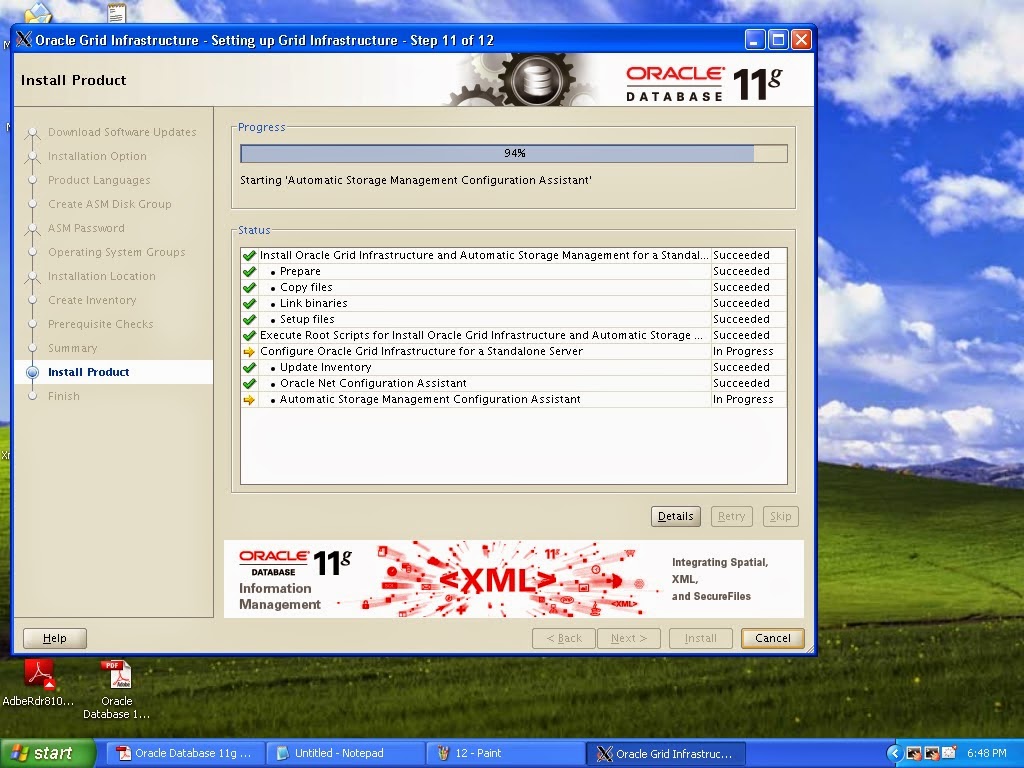
Configure Oracle ASM Instance Using 11G r2 grid Infrastructure..

In this post, I am showing you how to configure oracle ASM instance Using oracle 11g r2 grid infrastructure ( ASMLIB*  Packages)? Before I start configuration, let you know what kind infrastructure I have?.

-          RHEL 5.4
-          Oracle grid s/w 11g r2 (p10098816_112020_Linux-x86-64_3of7)
Requirement:-
                      For this installation we want ASMlib packages which I mentioned below.
- oracleasm-support-2.1.7-1.el5.x86_64.rpm
- oracleasm-2.6.18-164.el5-2.0.5-1.el5.x86_64.rpm
- oracleasmlib-2.0.4-1.el5.x86_64.rpm
- oracleasm-2.6.18-164.el5-debuginfo-2.0.5-1.el5.x86_64.rpm
- oracleasm-2.6.18-308.1.1.el5-2.0.5-1.el5.x86_64.rpm
                     Raw devices as per requirement in this installation I used three raw devices, per device size is 4 GB (for this raw devices you can ask to your system administrator)
-          /dev/sda5
-          /dev/sda6
-          /dev/sda7


1) First create raw devices as per requirement in this installation I used 3 raw devices.

    - /dev/sda5, /dev/sda6, /dev/sda7

2) Install Asmlib* packages

[root@alpha Asmlib-New-Package-64-Bit]# rpm -ivh oracleasm-support-2.1.7-1.el5.x86_64.rpm
 1:oracleasm-support      ########################################### [100%]
[root@alpha Asmlib-New-Package-64-Bit]# rpm -ivh oracleasm-2.6.18-164.el5-2.0.5-1.el5.x86_64.rpm
1:oracleasm-2.6.18-164.el########################################### [100%]
[root@alpha Asmlib-New-Package-64-Bit]# rpm -ivh oracleasmlib-2.0.4-1.el5.x86_64.rpm
1:oracleasmlib           ########################################### [100%]
[root@alpha Asmlib-New-Package-64-Bit]# rpm -ivh oracleasm-2.6.18-164.el5-debuginfo-2.0.5-1.el5.x86_64.rpm
 1:oracleasm-2.6.18-164.el########################################### [100%]
[root@alpha Asmlib-New-Package-64-Bit]# rpm -ivh oracleasm-2.6.18-308.1.1.el5-2.0.5-1.el5.x86_64.rpm
 1:oracleasm-2.6.18-308.1.########################################### [100%]

3) Configure Oracle Asm

[root@clone ~]# oracleasm configure -i
Configuring the Oracle ASM library driver.
This will configure the on-boot properties of the Oracle ASM library
driver.  The following questions will determine whether the driver is
loaded on boot and what permissions it will have.  The current values
will be shown in brackets ('[]').  Hitting <ENTER> without typing an
answer will keep that current value.  Ctrl-C will abort.
Default user to own the driver interface []: grid
Default group to own the driver interface []: asmdba
Start Oracle ASM library driver on boot (y/n) [n]: y
Scan for Oracle ASM disks on boot (y/n) [y]: y
Writing Oracle ASM library driver configuration: done

Note: - in this installation I used grid user for ASM instance.

[root@clone sysconfig]# oracleasm init
Creating /dev/oracleasm mount point: /dev/oracleasm
Loading module "oracleasm": oracleasm
Mounting ASMlib driver filesystem: /dev/oracleasm

4) Create Asm disk.

[root@clone sysconfig]# oracleasm  createdisk    Vol1   /dev/sda5
Writing disk header: done
Instantiating disk: done
[root@clone sysconfig]# oracleasm   createdisk   Vol2   /dev/sda6
Writing disk header: done
Instantiating disk: done
[root@clone sysconfig]# oracleasm createdisk   Vol3   /dev/sda7
Writing disk header: done
Instantiating disk: done
[root@clone sysconfig]# Oracleasm scandisks
Reloading disk partitions: done
Cleaning any stale ASM disks...
Scanning system for ASM disks...
[root@clone sysconfig]# oracleasm listdisks
VOL1
VOL2
VOL3

[grid@clone ~]$ xhost +
access control disabled, clients can connect from any host
[grid@clone ~]$ ll
total 834988
-rw-r--r-- 1 grid oinstall 854185065 Mar  1  2013 p10098816_112020_Linux-x86-64_3of7.zip
[grid@clone ~]$ unzip -q p10098816_112020_Linux-x86-64_3of7.zip
[grid@clone ~]$ ./RunInstaller


Note:- DATA is ASM Disk Name.


Note: - Here ASM Password showing in red colors because my password is not as per oracle recommended format.


[root@clone /]# /u01/app/oraInventory/orainstRoot.sh
Changing permissions of /u01/app/oraInventory.
Adding read,write permissions for group.
Removing read,write,execute permissions for world.

Changing groupname of /u01/app/oraInventory to oinstall.
The execution of the script is complete.

 [root@clone ~]# /u01/app/grid/product/11.2.0/grid/root.sh
Running Oracle 11g root script...

The following environment variables are set as:
    ORACLE_OWNER= grid
    ORACLE_HOME=  /u01/app/grid/product/11.2.0/grid

Enter the full pathname of the local bin directory: [/usr/local/bin]:
   Copying dbhome to /usr/local/bin ...
   Copying oraenv to /usr/local/bin ...
   Copying coraenv to /usr/local/bin ...


Creating /etc/oratab file...
Entries will be added to the /etc/oratab file as needed by
Database Configuration Assistant when a database is created
Finished running generic part of root script.
Now product-specific root actions will be performed.
Using configuration parameter file: /u01/app/grid/product/11.2.0/grid/crs/install/crsconfig_params
Creating trace directory
LOCAL ADD MODE
Creating OCR keys for user 'grid', privgrp 'oinstall'..
Operation successful.
LOCAL ONLY MODE
Successfully accumulated necessary OCR keys.
Creating OCR keys for user 'root', privgrp 'root'..
Operation successful.
CRS-4664: Node clone successfully pinned.
Adding daemon to inittab
ACFS-9300: ADVM/ACFS distribution files found.
ACFS-9307: Installing requested ADVM/ACFS software.
ACFS-9308: Loading installed ADVM/ACFS drivers.
ACFS-9321: Creating udev for ADVM/ACFS.
ACFS-9323: Creating module dependencies - this may take some time.
ACFS-9327: Verifying ADVM/ACFS devices.
ACFS-9309: ADVM/ACFS installation correctness verified.

clone     2014/07/07 00:16:50     /u01/app/grid/product/11.2.0/grid/cdata/clone/backup_20140707_001650.olr
Successfully configured Oracle Grid Infrastructure for a Standalone Server


Note:- For oracle gurus if I did any mistake in this post please let me know i will modify the blogs

Thanks

Login to the database as user C##GGUSER failed because of error Error while trying to retrieve text for error ORA-01804.

 Error :  2026-09-19 11:28:18  ERROR   OGG-00303  Unable to connect to database using user C##GGUSER@CDB. Ensure that the necessary privileg...