Sunday, 22 August 2021

ora-01153::undefined an incompatible media recovery is active


Information:  If you are seeing below error while starting MRP process means currently your MRP process is running. check MRP process status using below sql.

SQL> select process, status, sequence# from v$managed_standby where process in ('MRP0','RFS');

PROCESS   STATUS        SEQUENCE#
--------- ------------ ----------
MRP0      APPLYING_LOG         18
RFS       IDLE                 18
RFS       IDLE                  0


Note: if you want  start it again  then cancel it and start it again using below sql 

SQL> alter database recover managed standby database cancel;
Database altered.
SQL> ALTER DATABASE RECOVER MANAGED STANDBY DATABASE USING CURRENT LOGFILE DISCONNECT FROM SESSION;
Database altered.

Saturday, 7 August 2021

START and STOP data gaurs setup in data guard broker configuration

INFORMATION:  Before start below steps start listener on both side 


1. Start Source Database normal mode (open mode)


SQL> startup;

ORACLE instance started.

Total System Global Area 1593835520 bytes

Fixed Size                  8621184 bytes

Variable Size            1375732608 bytes

Database Buffers          201326592 bytes

Redo Buffers                8155136 bytes

Database mounted.

Database opened.


2. start target database(standby database) in mount mode


SQL> startup mount;

ORACLE instance started.

Total System Global Area 1593835520 bytes

Fixed Size                  8621184 bytes

Variable Size            1258292096 bytes

Database Buffers          318767104 bytes

Redo Buffers                8155136 bytes

Database mounted.


3. start MRP process 


SQL> ALTER DATABASE RECOVER MANAGED STANDBY DATABASE DISCONNECT FROM SESSION;

Database altered.


4. Validation 


  - Check MRP process is in running mode 

SQL> select process, status, sequence# from v$managed_standby where process like '%MRP%';


PROCESS   STATUS        SEQUENCE#

--------- ------------ ----------

MRP0      APPLYING_LOG         10


 - connect to DGMGRL prompt and check data gaurd configuration 


[oracle@DB12C ~]$ dgmgrl sys@DB12C_STB as sysdba

DGMGRL for Linux: Release 12.2.0.1.0 - Production on Sat Aug 7 18:46:44 2021

Copyright (c) 1982, 2017, Oracle and/or its affiliates.  All rights reserved.

Welome to DGMGRL, type "help" for information.

Password:

Connected to "DB12C_STB"

Connected as SYSDBA.

DGMGRL> show configuration;

Configuration - my_dg

  Protection Mode: MaxPerformance

  Members:

  db12c     - Primary database

    db12c_stb - Physical standby database

Fast-Start Failover: DISABLED

Configuration Status:

SUCCESS   (status updated 12 seconds ago)

Saturday, 31 July 2021

OCI Error ORA-00904: "INTCOL#": invalid identifier

 Error Details

 ERROR   OGG-00663  Oracle GoldenGate Capture for Oracle, ehrint01.prm:  OCI Error ORA-00904: "INTCOL#": invalid identifier

(status = 904), SQL <SELECT md_col_name, md_col_num, md_col_segcol,        md_col_type, md_col_len, md_col_prec,        md_col_scale, md_col_charsetid,        md_col_charsetform, md_col_alt_type,        md_col_alt_prec, md_col_alt_char_used,        md_col_alt_length, md_col_alt_type_owner,        property, xopqtypeflags , intcol#   FROM TABLE (system.logmnr$col_gg_tabf_public(                     :sid, :mdh, :object_id,                     :objv, to_number(:csn) ))>.


Solution

Apply the patch 17030189 on database and after applied patch execute script prvtlmcs.plb, prvtlmcb.plb, both script location are GG_HOME.

Wednesday, 21 July 2021

OGG-02022 Logmining server does not exist on this Oracle database.

 error: 

2021-07-21 16:33:31  ERROR   OGG-02022  Logmining server does not exist on this Oracle database.

2021-07-21 16:33:31  ERROR   OGG-01668  PROCESS ABENDING.


Solution 

dblogin userid gguser@<service_name> password <***>

register extract <extract_name>,database

Friday, 16 October 2020

ojdbc7.jar driver mentioned in agent.properties was not found. Exiting

 Error :

ERROR ojdbc7.jar driver mentioned in agent.properties was not found. Exiting.

Solution Details:

uncomment line server.driversLocation = drivers

comment line server.jdbcDriver=<server.jdbcDriver>

copy ojdbc7.jar to agent directory location driver folder 

and start agent 

[oracle@veridata agent1]$ sh agent.sh start agent.properties


Thursday, 17 September 2020

install mongoDB enterprise 4.4.0 on LVM storage


In this QuickStart, we learn how to:

  • Create LVM storage.
  • Download mongoDB 4.4.0 software and unzip
  • Install net-snmp package
  • create user and directory structure
  • Copy binary to mongo home
  • Set variable for mongoDB in Bash profile
  • Create config file for mongoDB instance
  • Start mongo daemon using config file
  • Validation

1] Create LVM storage.


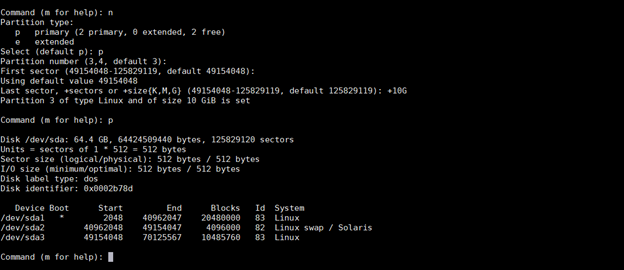
·         list existing partition


[root@lvm_node ~]# fdisk -l


·         create new partition for LVM Disk Group


-          Enter P to display the existing Partitions 

-          Create New partition of 10GB size


-          Change the partition to LVM system


-          Use partprobe command to change the partition table


-          Move newly created disk to lvm PV


-          create the volume group


-          create lvm on volume group 


-          Format the LVM file system to use


                   -      Mount LVM file system to directory 


                     -        Made the changes in /etc/fstab to permanent changes


2] Download mongoDB 4.4.0 software and unzip

https://www.mongodb.com/try/download/enterprise


[mongo@lvm_node tmp]$ pwd

/tmp

[mongo@lvm_node tmp]$

[mongo@lvm_node ~]$ cd /tmp

[mongo@lvm_node tmp]$ ls -ltr

total 128900

-rw-rw-r--. 1 mongo mongo 131986084 Aug 22 15:40 mongodb-linux-x86_64-enterprise-rhel70-4.4.0.tgz

-rw-------. 1 root  root          0 Aug 25 21:16 yum.log

-rwx------. 1 root  root        836 Aug 25 21:30 ks-script-9cUA9D


[mongo@lvm_node tmp]$ tar -xvzf mongodb-linux-x86_64-enterprise-rhel70-4.4.0.tgz

mongodb-linux-x86_64-enterprise-rhel70-4.4.0/LICENSE-Enterprise.txt

mongodb-linux-x86_64-enterprise-rhel70-4.4.0/MPL-2

mongodb-linux-x86_64-enterprise-rhel70-4.4.0/README

mongodb-linux-x86_64-enterprise-rhel70-4.4.0/THIRD-PARTY-NOTICES

mongodb-linux-x86_64-enterprise-rhel70-4.4.0/bin/install_compass

mongodb-linux-x86_64-enterprise-rhel70-4.4.0/bin/mongo

mongodb-linux-x86_64-enterprise-rhel70-4.4.0/bin/mongocryptd

mongodb-linux-x86_64-enterprise-rhel70-4.4.0/bin/mongod

mongodb-linux-x86_64-enterprise-rhel70-4.4.0/bin/mongodecrypt

mongodb-linux-x86_64-enterprise-rhel70-4.4.0/bin/mongokerberos

mongodb-linux-x86_64-enterprise-rhel70-4.4.0/bin/mongoldap

mongodb-linux-x86_64-enterprise-rhel70-4.4.0/bin/mongos

mongodb-linux-x86_64-enterprise-rhel70-4.4.0/snmp/MONGOD-MIB.txt

mongodb-linux-x86_64-enterprise-rhel70-4.4.0/snmp/MONGODBINC-MIB.txt

mongodb-linux-x86_64-enterprise-rhel70-4.4.0/snmp/README-snmp.txt

mongodb-linux-x86_64-enterprise-rhel70-4.4.0/snmp/mongod.conf.master

mongodb-linux-x86_64-enterprise-rhel70-4.4.0/snmp/mongod.conf.subagent

3] Install net-snmp package

[root@lvm_node ~]# yum install net-snmp*

Loaded plugins: fastestmirror

Loading mirror speeds from cached hostfile

 * base: mirrors.raystedman.org

 * extras: distro.ibiblio.org

 * updates: mirror.cs.uwp.edu

base                                                                                                                                               | 3.6 kB  00:00:00

extras                                                                                                                                             | 2.9 kB  00:00:00

updates                                                                                                                                            | 2.9 kB  00:00:00

Resolving Dependencies

--> Running transaction check

---> Package net-snmp.x86_64 1:5.7.2-48.el7_8.1 will be installed

--> Processing Dependency: libsensors.so.4()(64bit) for package: 1:net-snmp-5.7.2-48.el7_8.1.x86_64

---> Package net-snmp-agent-libs.x86_64 1:5.7.2-48.el7_8.1 will be installed

-

-

-

-

-

-

Dependency Updated:

  e2fsprogs.x86_64 0:1.42.9-17.el7        e2fsprogs-libs.x86_64 0:1.42.9-17.el7      elfutils.x86_64 0:0.176-4.el7              elfutils-libelf.x86_64 0:0.176-4.el7

  elfutils-libs.x86_64 0:0.176-4.el7      krb5-libs.x86_64 0:1.15.1-46.el7           libcom_err.x86_64 0:1.42.9-17.el7          libdb.x86_64 0:5.3.21-25.el7

  libdb-utils.x86_64 0:5.3.21-25.el7      libselinux.x86_64 0:2.5-15.el7             libselinux-python.x86_64 0:2.5-15.el7      libselinux-utils.x86_64 0:2.5-15.el7

  libss.x86_64 0:1.42.9-17.el7            openssl.x86_64 1:1.0.2k-19.el7             openssl-libs.x86_64 1:1.0.2k-19.el7        rpm.x86_64 0:4.11.3-43.el7

  rpm-build.x86_64 0:4.11.3-43.el7        rpm-build-libs.x86_64 0:4.11.3-43.el7      rpm-libs.x86_64 0:4.11.3-43.el7            rpm-python.x86_64 0:4.11.3-43.el7

  rpm-sign.x86_64 0:4.11.3-43.el7


Complete!

[root@lvm_node ~]#


4] create user and directory structure

[root@lvm_node ~]# adduser mongo

[root@lvm_node ~]# passwd mongo

Changing password for user mongo.

New password:

BAD PASSWORD: The password is shorter than 8 characters

Retype new password:

passwd: all authentication tokens updated successfully.

[root@lvm_node ~]#

[root@lvm_node ~]# chown mongo:mongo /u01/app

[root@lvm_node ~]# chmod 775 /u01/app

[root@lvm_node ~]#

[root@lvm_node ~]# su - mongo

Last login: Sat Aug 29 17:29:23 EDT 2020 on pts/0

[mongo@lvm_node ~]$

[mongo@lvm_node ~]$ mkdir -p /u01/app/mongo/product

[mongo@lvm_node 4.4.0]$

[mongo@lvm_node 4.4.0]$ mkdir -p /u01/app/mongo/etc

[mongo@lvm_node 4.4.0]$ mkdir -p /u01/app/mongo/data

[mongo@lvm_node 4.4.0]$ mkdir -p /u01/app/mongo/log

[mongo@lvm_node 4.4.0]$


5] Copy binary to mongo home 

[mongo@lvm_node tmp]$ mv mongodb-linux-x86_64-enterprise-rhel70-4.4.0 /u01/app/mongo/product/

[mongo@lvm_node tmp]$ cd /u01/app/mongo/product/

[mongo@lvm_node product]$ ls -ltr

total 4

drwxrwxr-x. 4 mongo mongo 4096 Aug 29 17:36 mongodb-linux-x86_64-enterprise-rhel70-4.4.0

[mongo@lvm_node product]$ mv mongodb-linux-x86_64-enterprise-rhel70-4.4.0 4.4.0

[mongo@lvm_node product]$ cd 4.4.0

[mongo@lvm_node 4.4.0]$ pwd

/u01/app/mongo/product/4.4.0

[mongo@lvm_node 4.4.0]$

6] Set variable for mongoDB in Bash profile 


7]  Create config file for mongoDB instance

[mongo@lvm_node 4.4.0]$ cd /u01/app/mongo/etc/

[mongo@lvm_node etc]$ pwd

/u01/app/mongo/etc

[mongo@lvm_node etc]$ vi mongoDB.conf

[mongo@lvm_node etc]$ cat mongoDB.conf

# mongod.conf

# for documentation of all options, see:

#   http://docs.mongodb.org/manual/reference/configuration-options/

# where to write logging data.

systemLog:

  destination: file

  logAppend: true

  path: /u01/app/mongo/log/mongod.log

# Where and how to store data.

storage:

  dbPath: /u01/app/mongo/data

  journal:

    enabled: true

#  engine:

#  mmapv1:

#  wiredTiger:

# how the process runs

processManagement:

  fork: true  # fork and run in background

  pidFilePath: /u01/app/mongo/data/mongod.pid  # location of pidfile

# network interfaces

net:

  port: 27017

  bindIp: localhost  # Listen to local interface only, comment to listen on all interfaces.

security:

 authorization: enabled

 keyFile: /u01/app/mongo/pkey/dev1-key

#security:

#operationProfiling:

#replication:


8] Start mongo daemon using config file


[mongo@lvm_node etc]$ pwd

/u01/app/mongo/etc

[mongo@lvm_node etc]$ ls -ltr

total 4

-rw-rw-r--. 1 mongo mongo 783 Aug 29 18:40 mongoDB.conf

[mongo@lvm_node etc]$ mongod -f /u01/app/mongo/etc/mongoDB.conf

about to fork child process, waiting until server is ready for connections.

forked process: 16097

child process started successfully, parent exiting

[mongod@localhost ~]$

9] validation

[mongo@lvm_node etc]$ mongo

MongoDB shell version v4.4.0

connecting to: mongodb://127.0.0.1:27017/?compressors=disabled&gssapiServiceName=mongodb

Implicit session: session { "id" : UUID("fcec5d01-62d1-40e2-9d38-a12e8d6529b0") }

MongoDB server version: 4.4.0

MongoDB Enterprise > db.version()

4.4.0

MongoDB Enterprise >


Monday, 14 September 2020

Sort operation used more than the maximum 33554432 bytes of RAM. Add an index, or specify a smaller limit.


Error: 

Error: error: {

        "ok" : 0,

        "errmsg" : "Executor error during find command: OperationFailed: Sort operation used more than the maximum 33554432 bytes of RAM. Add an index, or specify a smaller limit.",

        "code" : 96,

        "codeName" : "OperationFailed"

}


Solution: 

         when you execute query on large collection that time error will come. use limit() method to get data.

db.employees.find().sort({employee_id: 1 } ).limit(1)


Install and Configure 26AI Database on Linux

  Topic : Install and Configure 26AI Database on Linux   Deployment Diagram: In this QuickStart, we learn how to: Infrastructur...